Brenlify, Where Ideas Turn into Digital Growth.

  • hello@brenlify.com

Brenlify
  • Home
  • Services
    • Explore servicesCreative support for every stage of your brand.

      Choose a category to see services, packages and pricing.

      View all services
      Logo & Brand IdentityLogos, brand systems and visual direction.Website & App DesignBusiness websites, landing pages and digital experiences.Illustration & Creative ArtCustom illustration, patterns and visual assets.Marketing & Campaign DesignSocial content, ads, flyers and campaign creative.Print & Brand EssentialsBrochures, menus, stationery and print design.Packaging & Label DesignPackaging systems, labels and product artwork.Career BrandingResumes, personal branding and professional presentation.Templates & Business ToolsReusable templates, presentations and practical tools.
      Featured service

      Managed Website Design + Care

      A professional website with ongoing updates, support and care in one package.

      Bun & Ember responsive restaurant website project
      See packagesStart a project
  • Growth Lab
    • Explore Growth LabLearn & GrowPractical PDF books, guides and working resources you can keep and use.Insights & ArticlesIdeas for branding, design and digital growth.My LibraryRead and download your purchased books.
      BRENLIFYGROWTH LAB
      Digital book + PDF

      Crypto Mastery

      A practical guide to crypto, blockchain, investing and digital-asset security.

      161 pagesBeginner
      Explore book
      Latest article

      How to Balance a Logo Like a Professional

      Learn how to align a symbol and wordmark with practical grid units, optical correction, horizontal and vertical lockups, clearspace rules and real-world testing.

      How to Balance a Logo Like a Professional
      Read article
  • Our Work
  • About
Let's Talk
Brenlify
  • Home
  • Services
    • Explore servicesCreative support for every stage of your brand.

      Choose a category to see services, packages and pricing.

      View all services
      Logo & Brand IdentityLogos, brand systems and visual direction.Website & App DesignBusiness websites, landing pages and digital experiences.Illustration & Creative ArtCustom illustration, patterns and visual assets.Marketing & Campaign DesignSocial content, ads, flyers and campaign creative.Print & Brand EssentialsBrochures, menus, stationery and print design.Packaging & Label DesignPackaging systems, labels and product artwork.Career BrandingResumes, personal branding and professional presentation.Templates & Business ToolsReusable templates, presentations and practical tools.
      Featured service

      Managed Website Design + Care

      A professional website with ongoing updates, support and care in one package.

      Bun & Ember responsive restaurant website project
      See packagesStart a project
  • Growth Lab
    • Explore Growth LabLearn & GrowPractical PDF books, guides and working resources you can keep and use.Insights & ArticlesIdeas for branding, design and digital growth.My LibraryRead and download your purchased books.
      BRENLIFYGROWTH LAB
      Digital book + PDF

      Crypto Mastery

      A practical guide to crypto, blockchain, investing and digital-asset security.

      161 pagesBeginner
      Explore book
      Latest article

      How to Balance a Logo Like a Professional

      Learn how to align a symbol and wordmark with practical grid units, optical correction, horizontal and vertical lockups, clearspace rules and real-world testing.

      How to Balance a Logo Like a Professional
      Read article
  • Our Work
  • About
Let's Talk
Logo
  • Home
  • Services
    • Logo & Brand Identity
    • Website & App Design
    • Illustration & Creative Art
    • Marketing & Campaign Design
    • Print & Brand Essentials
    • Packaging & Label Design
    • Career Branding
    • Templates & Business Tools
    • View All Services
  • Growth Lab
    • Learn & Grow
    • Insights & Articles
    • My Library
    • Visit Growth Lab
  • Our Work
  • About
  • Contact
  • hello@brenlify.com
X
Brenlify

Start Here

Creative services and practical learning in one place. Choose the path that matches what you need right now.

Start a ProjectExplore ServicesLearn in Growth LabSee Our Work
Prefer a quick question?hello@brenlify.com

How to Run Facebook Ads That Actually Convert: Beginner-to-Pro Guide

  • Home
  • Insights & Articles
  • Social Media
How to Run Facebook Ads That Actually Convert: Beginner-to-Pro Guide
PageBrenlify | Digital GrowthBrenlify.com
Growth Lab • Social Media

How to Run Facebook Ads That Actually Convert: Beginner-to-Pro Guide

A beginner-to-pro guide to building, launching, measuring and improving Facebook and Instagram ads around sales, leads and real business profit.

25 September 202630 min read
Growth Lab • Social Media
Meta Ads Manager can launch an ad in minutes. Building a campaign that can return more value than it spends takes more work. This guide starts with the numbers, tracking, offer and creative, then walks through the current Facebook and Instagram ad setup from campaign creation to optimisation and scaling.
25 September 202630 min read
Font size
On this page
Know your profit numbersInstall tracking firstFix the offer and landing pagePlan creative that can sellOpen Meta Ads ManagerChoose campaign settingsBudget and A/B testingSet up for purchasesBuild the audienceChoose placementsBuild the adChoose the destinationLaunch without over-editingRead the numbers properlyAdd retargetingScale profitable campaignsCampaign playbooksCommon mistakesSeven-day launch planCommon questions
Related servicesNeed help with this?
Brenlify service

Social Content Starter Pack

From A$399

View service →
Brenlify service

Social Media Post Design

From A$99

View service →
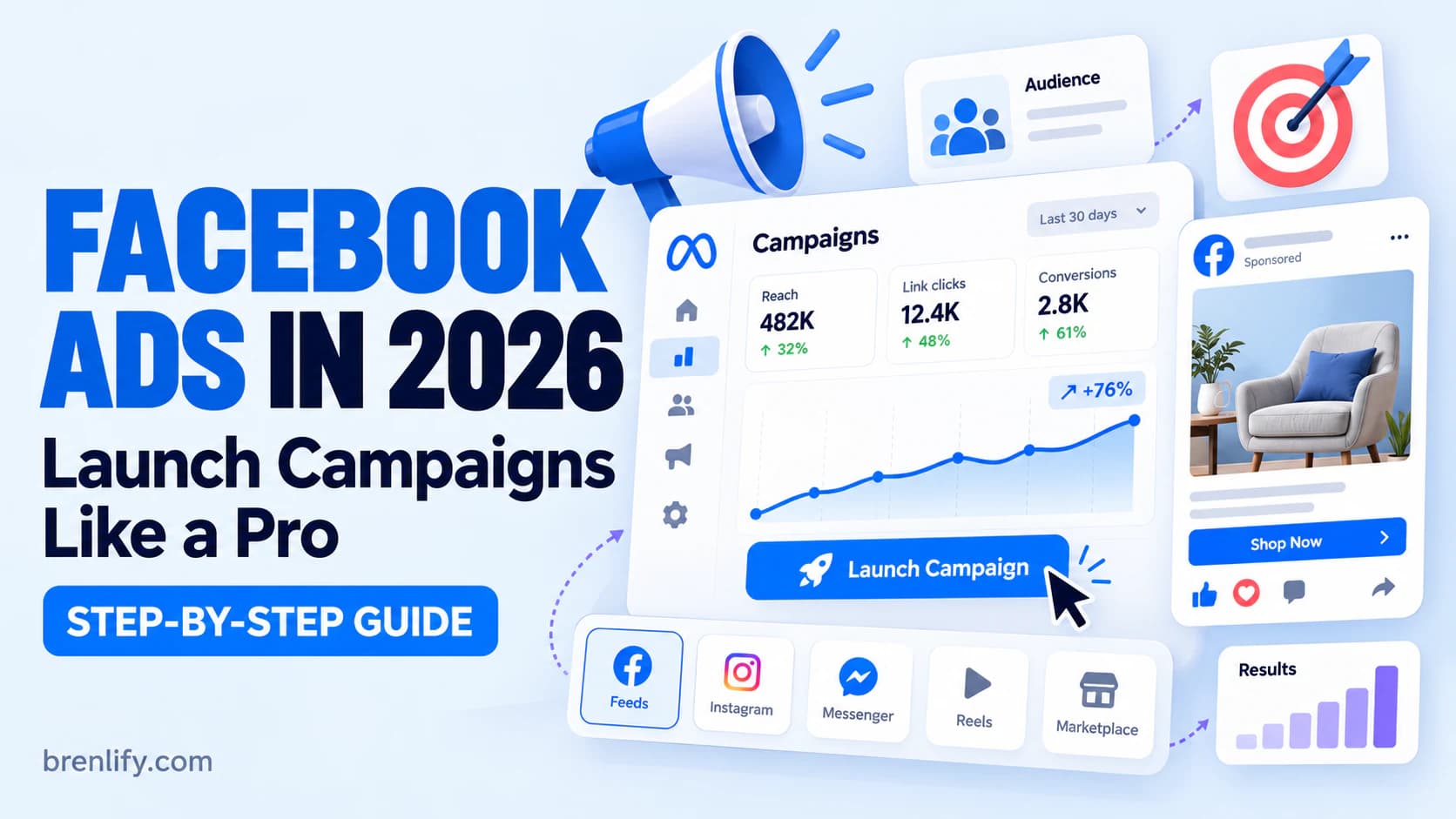
Facebook Ads in 2026 step-by-step campaign guide
00
The short version

A profitable Facebook ad is a business system, not an Ads Manager setting.

Meta can find people, distribute budget and optimise delivery, but it cannot rescue a weak offer, broken tracking, unconvincing creative or a landing page that does not convert. The professional way to run ads is to connect all of those parts to one number: how much you can afford to pay for a customer or qualified lead.

No ad campaign can guarantee profit. The goal of this guide is to give your campaign a realistic path to profit, measure it correctly and stop you from scaling results that only look good inside Ads Manager.
01

Before you spend $1, know what a customer is worth

A campaign cannot be called profitable because it has a cheap click, a high CTR or even a good-looking ROAS. You need to know how much money remains after the sale and how much of that amount you are willing to spend to acquire the customer.

CPAAd spend ÷ purchases

Your actual cost to acquire one tracked purchase.

Break-even CPAContribution before ads

The most you can spend on acquisition before the order stops contributing profit.

ROASRevenue ÷ ad spend

Useful for media efficiency, but only meaningful when you know your margin.

Example: a $100 physical product

Imagine an average order is $100. Product, fulfilment, payment fees, expected refunds and other variable costs total $40. That leaves $60 before advertising. Your break-even CPA is therefore $60, and your break-even ROAS is about 1.67x. If you want to keep $20 contribution after advertising, your target CPA becomes $40 and your target ROAS becomes 2.5x.

Example: a $29 PDF

If a $29 digital product has $4 of payment, refund, affiliate, support or other variable-cost allowance, it contributes $25 before ads. Break-even CPA is $25. If you want to keep $10 per sale after advertising, the target CPA is $15, which means roughly 1.93x revenue ROAS.

Example: a service lead

For services, work backwards from the sale. If a new client contributes $1,000 before acquisition cost and 20% of qualified leads become clients, each qualified lead is worth $200 on average before ad spend. That is your theoretical break-even CPL. A practical target should be lower so the business keeps enough margin.

Use your real numbers. Include variable fulfilment, payment fees, refunds, commissions and other costs that rise when you make a sale. Tax treatment and overhead differ by business, so your accounting view of profit may be wider than this campaign calculation.
02

Install tracking before you ask Meta to find buyers

The delivery system learns from signals. If your site records a PageView but not a Purchase, or fires duplicate purchases, you are teaching Meta from incomplete data and judging the campaign with unreliable numbers.

  1. Install the Meta Pixel: connect it through your ecommerce platform, website integration or tag setup.
  2. Add Conversions API where supported: server-side events can strengthen measurement when browser signals are limited.
  3. Test the event that matters: complete a real or test checkout and confirm that Purchase fires with the correct value and currency. For a lead campaign, test the actual Lead event.
  4. Prevent duplicate events: if browser and server send the same event, make sure your integration can deduplicate them.
  5. Add UTMs: identify campaign, ad set and creative in analytics, ecommerce reporting or your CRM.
  6. Cross-check revenue: compare Meta with Shopify, Stripe, WooCommerce, GA4 or your CRM. Attribution platforms will not always match perfectly.

Professional rule: never discover after a week of spend that your purchase event was broken. Test the full customer path before launch.

03

Ads amplify the offer you already have

A campaign sends qualified attention into a funnel. The offer and destination have to turn that attention into action. Before opening Ads Manager, make the page answer the questions a buyer needs answered quickly.

Clear outcome

What changes for the customer after buying or enquiring?

Specific offer

What exactly do they receive, at what price, and what is included?

Proof

Show examples, demonstrations, reviews, results or credible reasons to trust you.

Low friction

Make the next action obvious, mobile-friendly and easy to complete.

Do not send a focused ad to a generic homepage if the customer then has to search for the product or service. Message match matters: the promise in the ad should continue on the landing page, and the CTA should lead directly to the action you are optimising for.

04

Build a creative testing system before building the campaign

The biggest lever in many paid-social campaigns is creative. A professional test does not make five nearly identical ads and call them five ideas. Start with different reasons a customer might care.

01
Problem or frustration

Lead with the costly, annoying or slow situation your customer already recognises.

02
Desired outcome

Show the result they want and make the product or service the believable bridge.

03
Proof or demonstration

Show the product working, a before-and-after process, samples, testimonials or evidence.

04
Offer-led creative

Make price, bundle, bonus, guarantee or time-sensitive reason clear when it is genuinely part of the offer.

05
Founder or story angle

Explain why the product exists, who it is for and the insight behind it.

For video, earn attention immediately. Show the product, problem, result or strong statement in the opening seconds. For feeds, prepare a strong 4:5 asset where possible. For Stories and Reels, create a proper 9:16 version with important text and UI-safe elements kept away from the edges.

Need campaign-ready creative?

Your media buy can only work with the creative you give it.

Brenlify designs digital ad creative built around the offer, message hierarchy and the placements where the campaign will run, including feed and vertical social formats.

Explore Digital Ad DesignTalk about your campaign
05

Open Meta Ads Manager, not just the Boost Post button

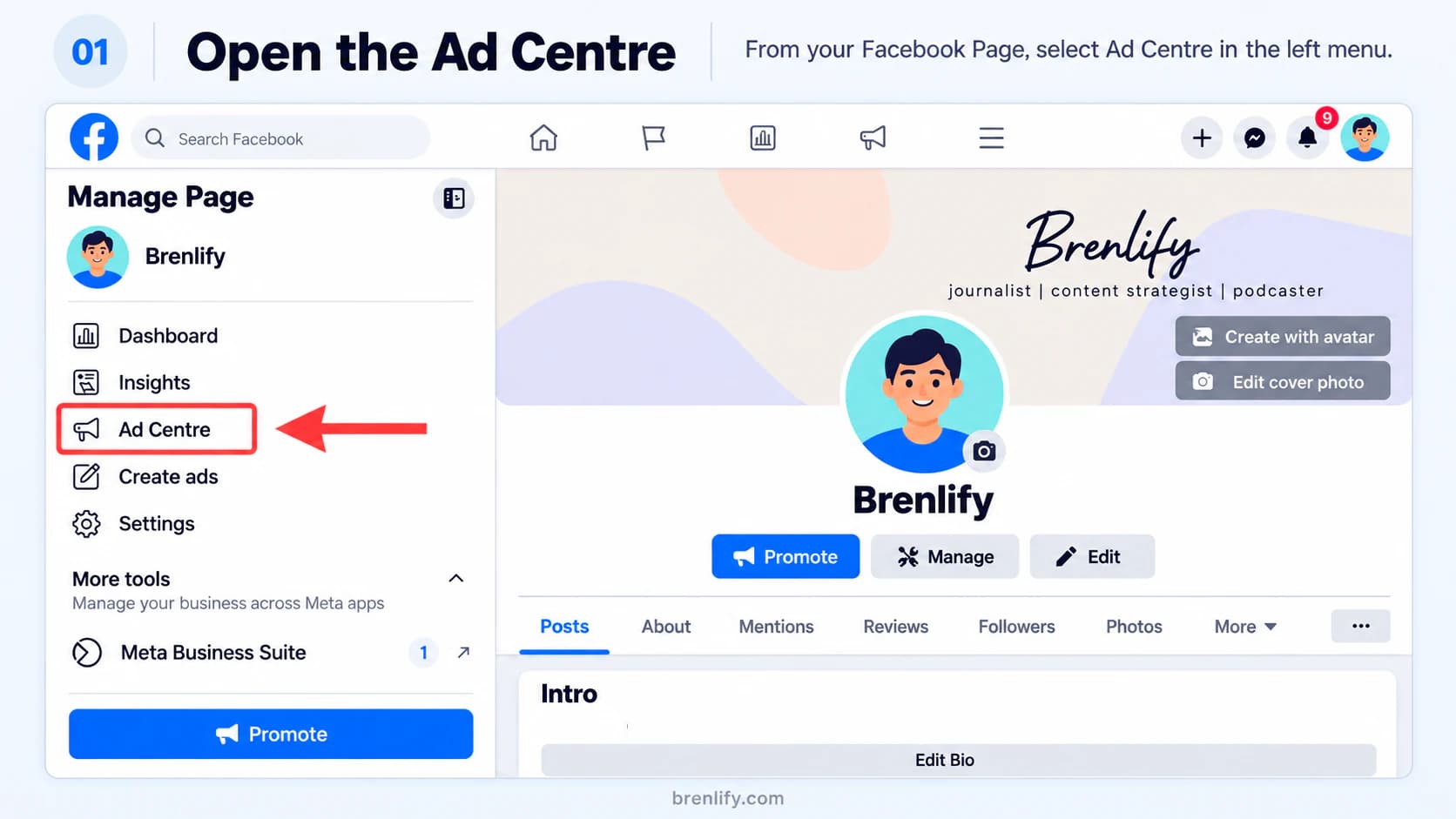
Ads Manager gives you the campaign, ad set and ad controls you need for conversion campaigns. You can reach it from your Facebook Page or open Ads Manager directly.

Step 1 showing how to open the Facebook Ad Centre from a business Page

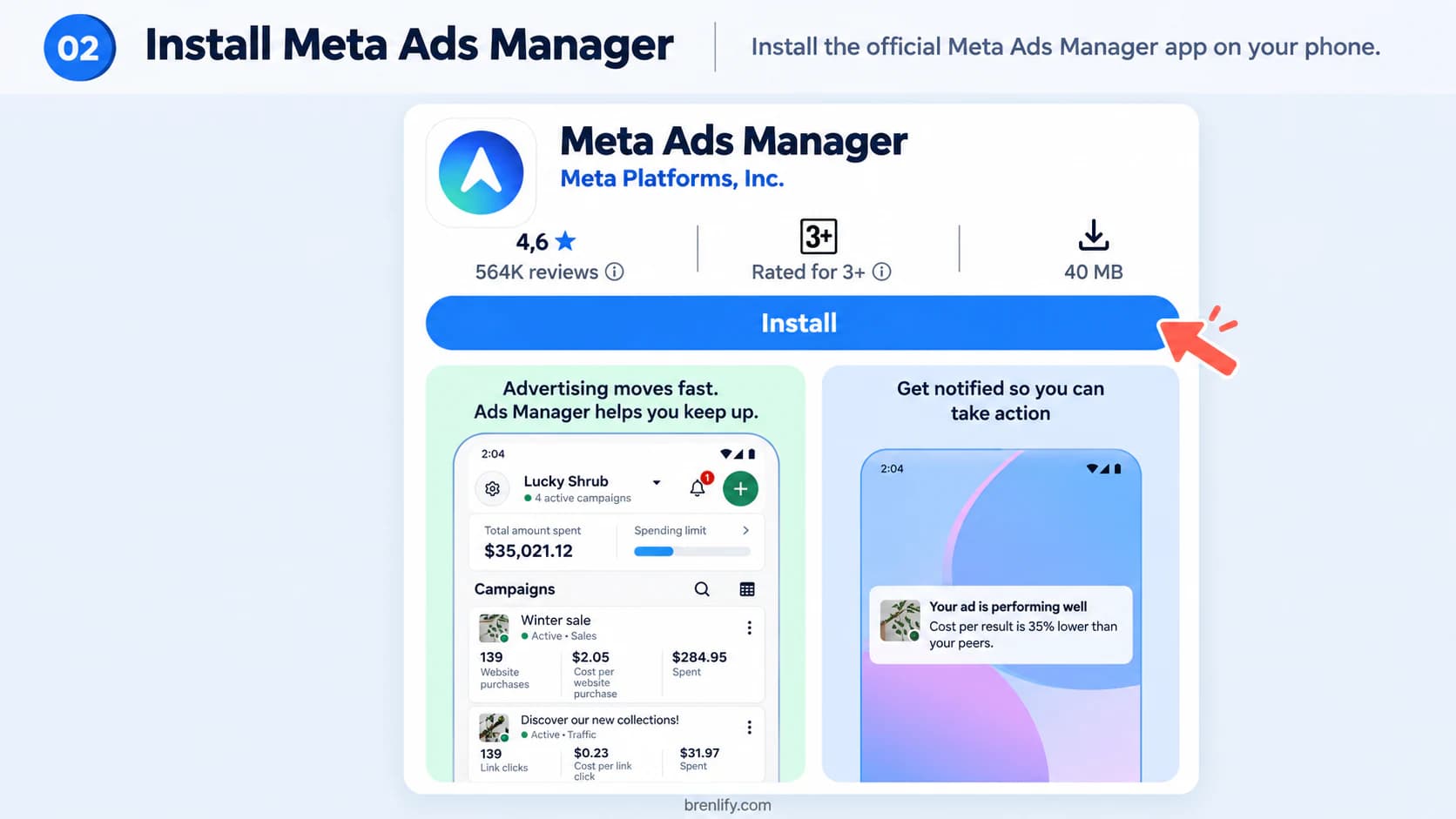
Meta also offers an Ads Manager mobile app. It is useful for checking delivery, notifications and urgent changes, but desktop Ads Manager is generally easier for building a complete campaign.

Step 2 showing the Meta Ads Manager mobile app

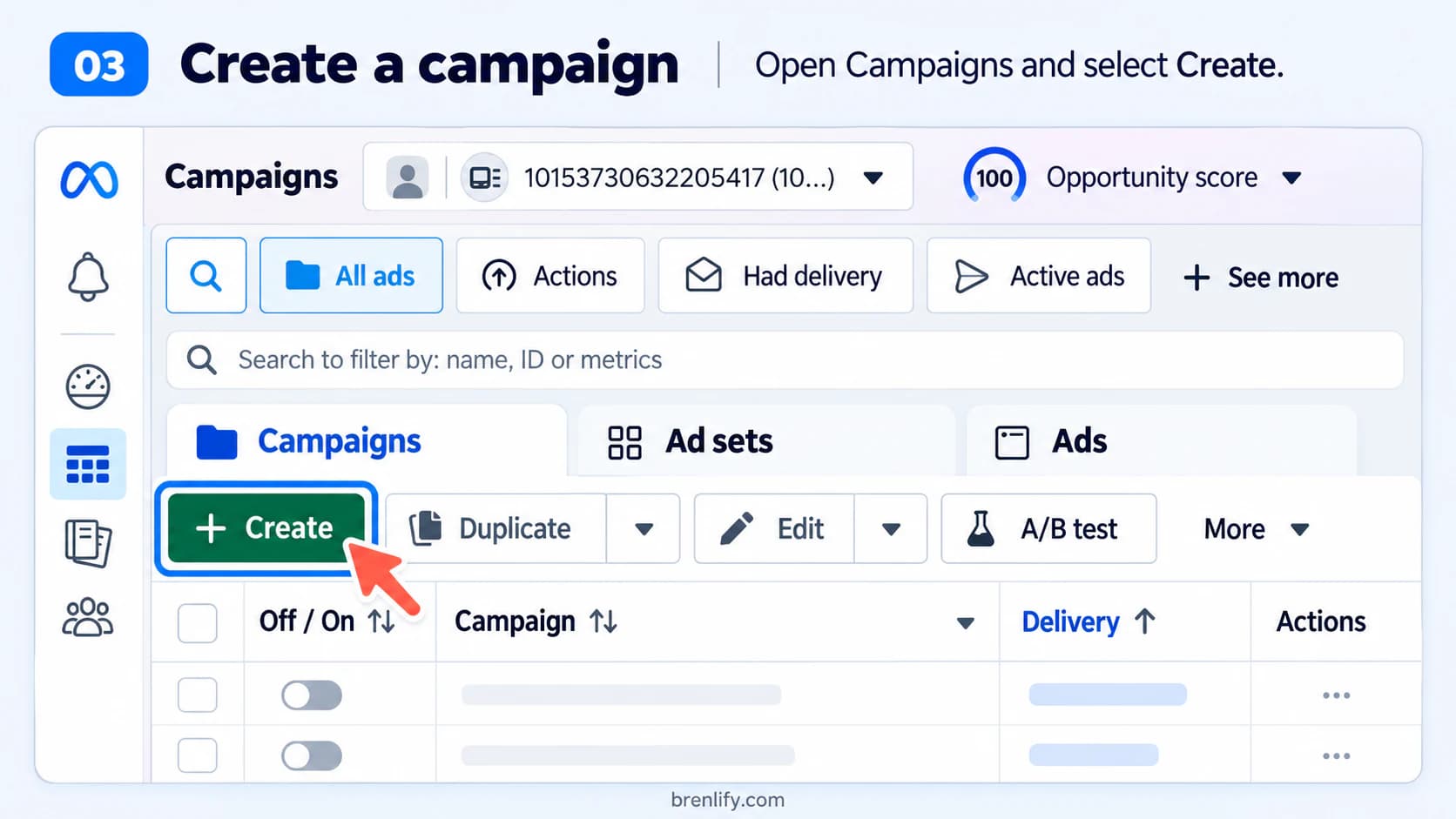
In Ads Manager, choose the correct ad account, open the Campaigns level and select Create.

Step 3 showing the Create campaign button in Meta Ads Manager
06

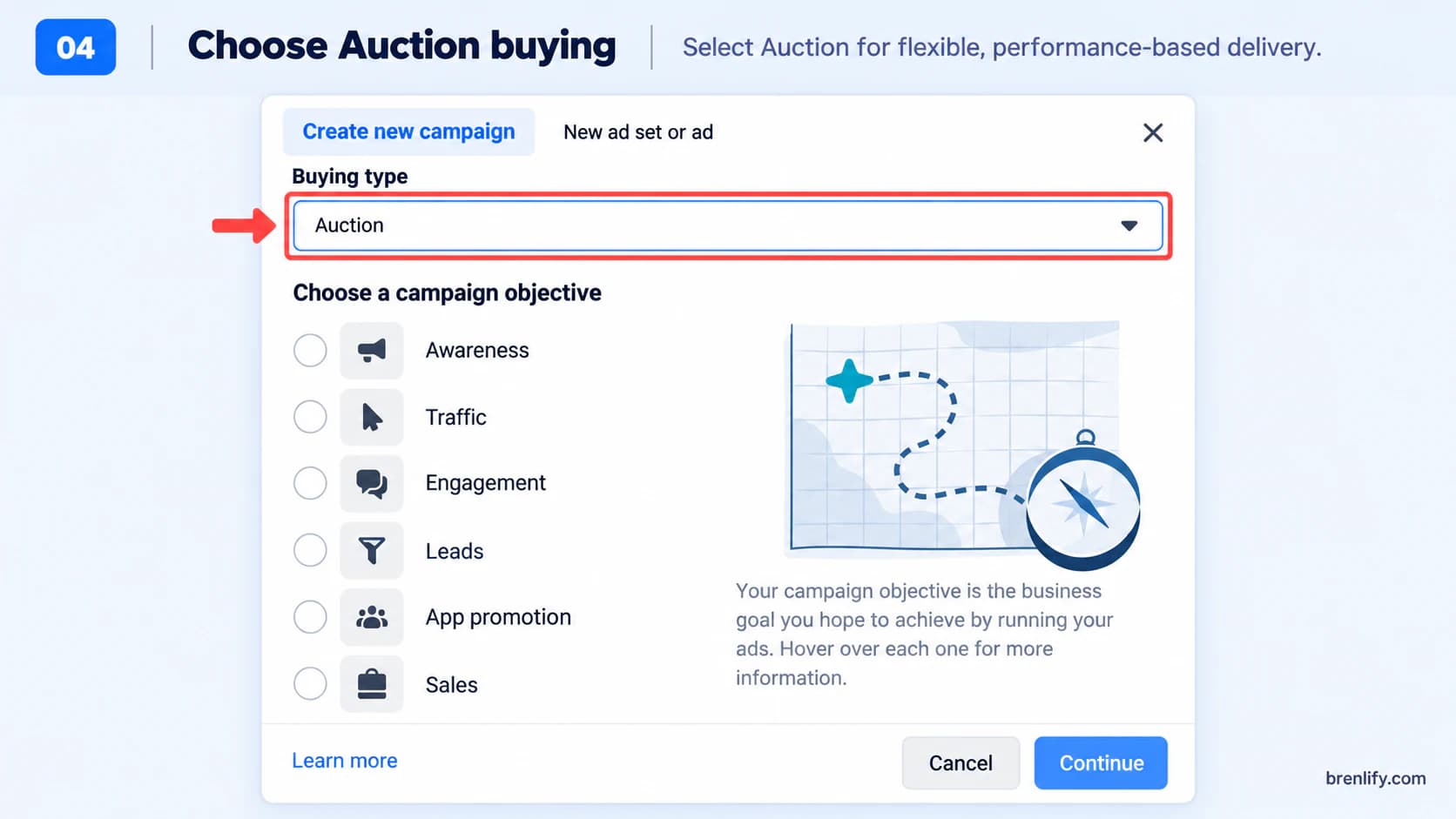
Use Auction for a normal performance campaign

Meta offers Auction and Reservation buying. For a sales, lead or performance campaign, Auction is the practical default because it supports flexible delivery and the wider range of objectives.

Step 4 showing Auction buying type in Meta Ads Manager

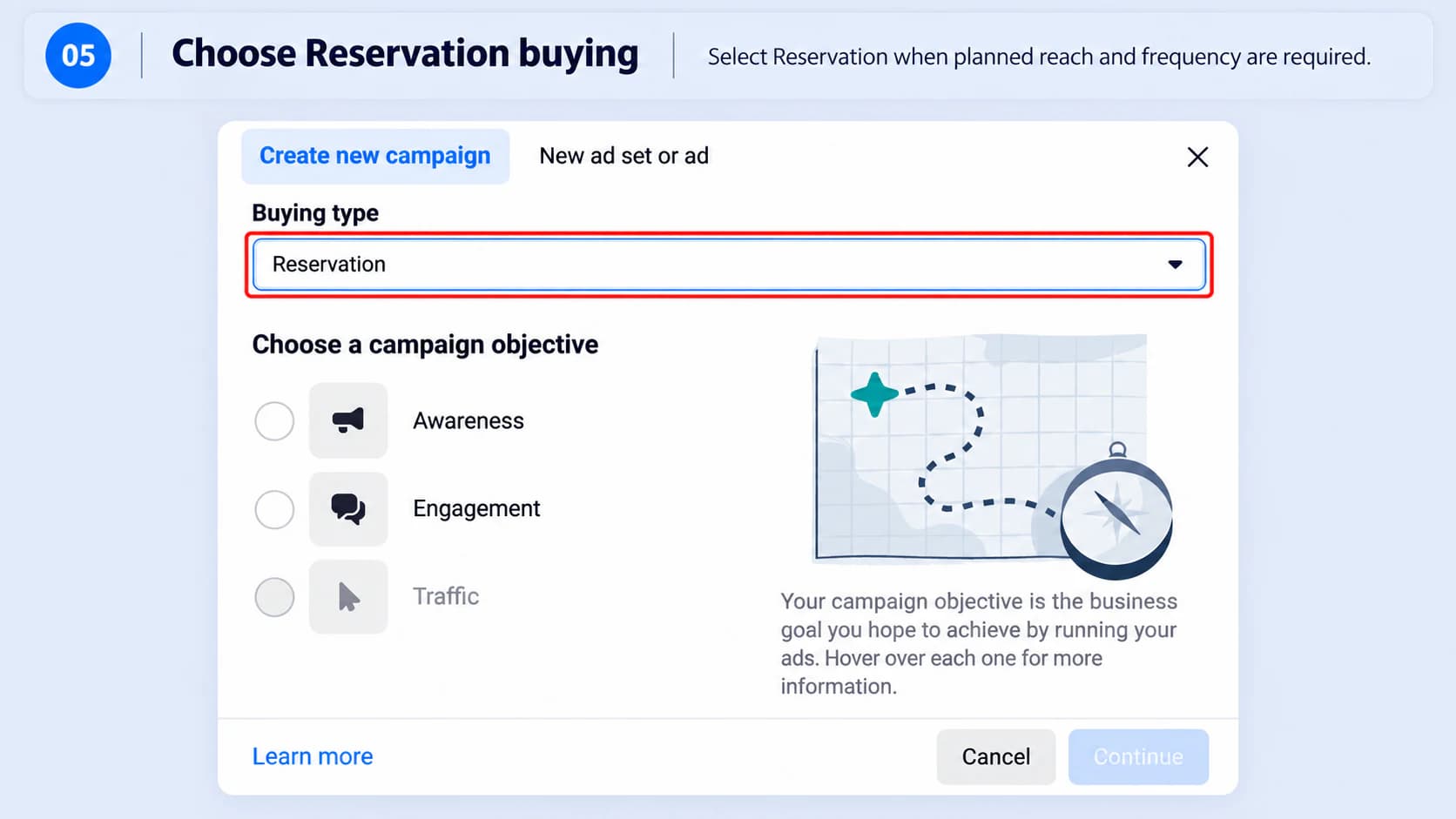
Reservation is designed for planned reach and frequency use cases. It is useful to know that it exists, but it is not the route this sales guide follows.

Step 5 showing Reservation buying type as an alternative option

Choose the objective that matches the real business outcome

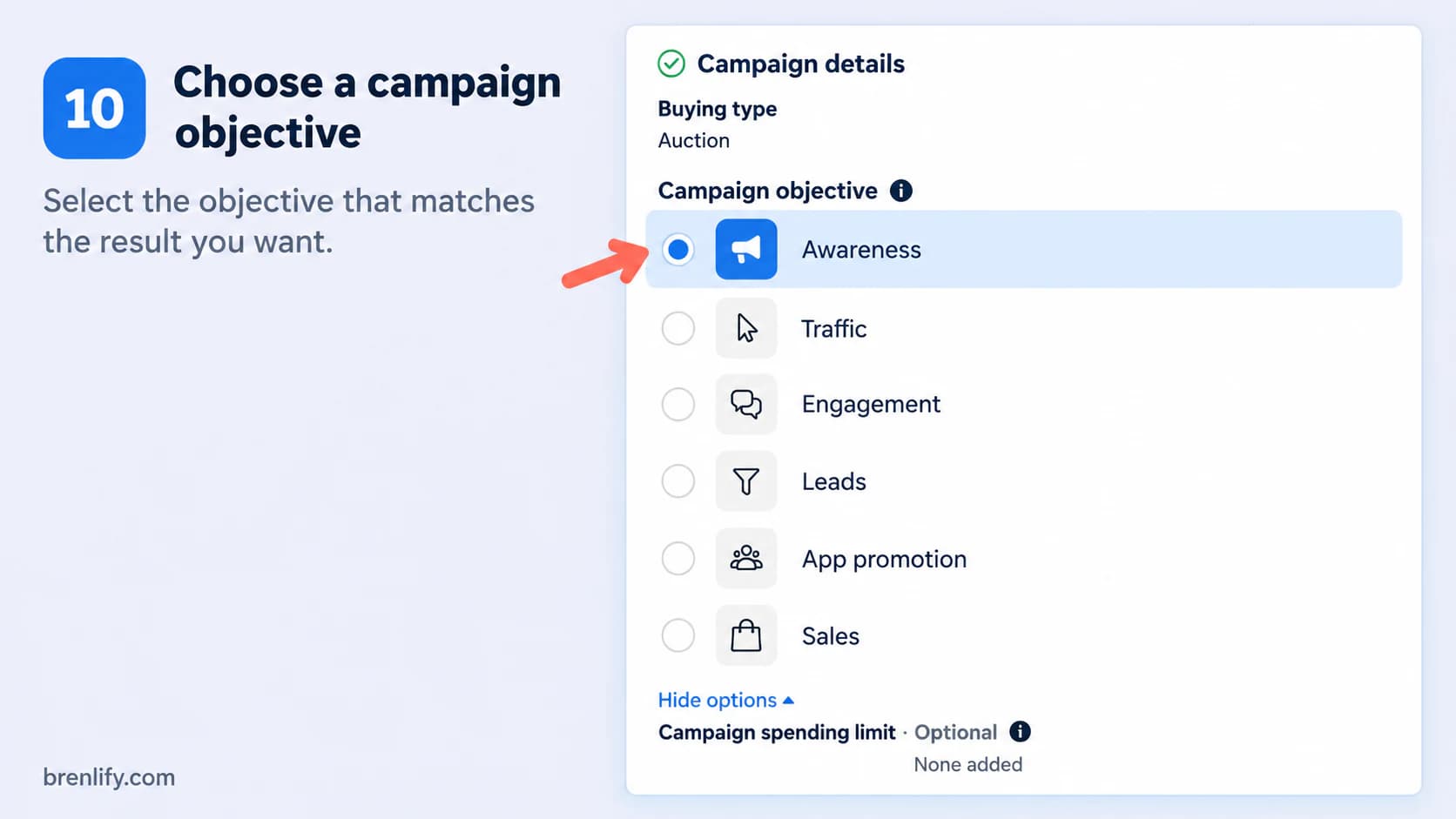
If the customer can purchase a PDF, product or fixed-price service on your website, choose Sales. If the sale normally happens after an enquiry, the Leads objective may fit better. If your sales process happens in Messenger, Instagram or WhatsApp, a messaging path can make sense.

Important image note: the objective screenshot below highlights Awareness to show where the objective selector is. For the direct-purchase campaign in this guide, select Sales, not Awareness.
Step 10 showing the Meta campaign objective selector where Sales should be selected for purchases

Do not choose Traffic just because clicks look cheaper when the actual goal is a sale. Meta optimises delivery around the result you ask for. If you ask for clicks, you can get people who click without being the people most likely to buy.

Name the campaign so future-you can understand it

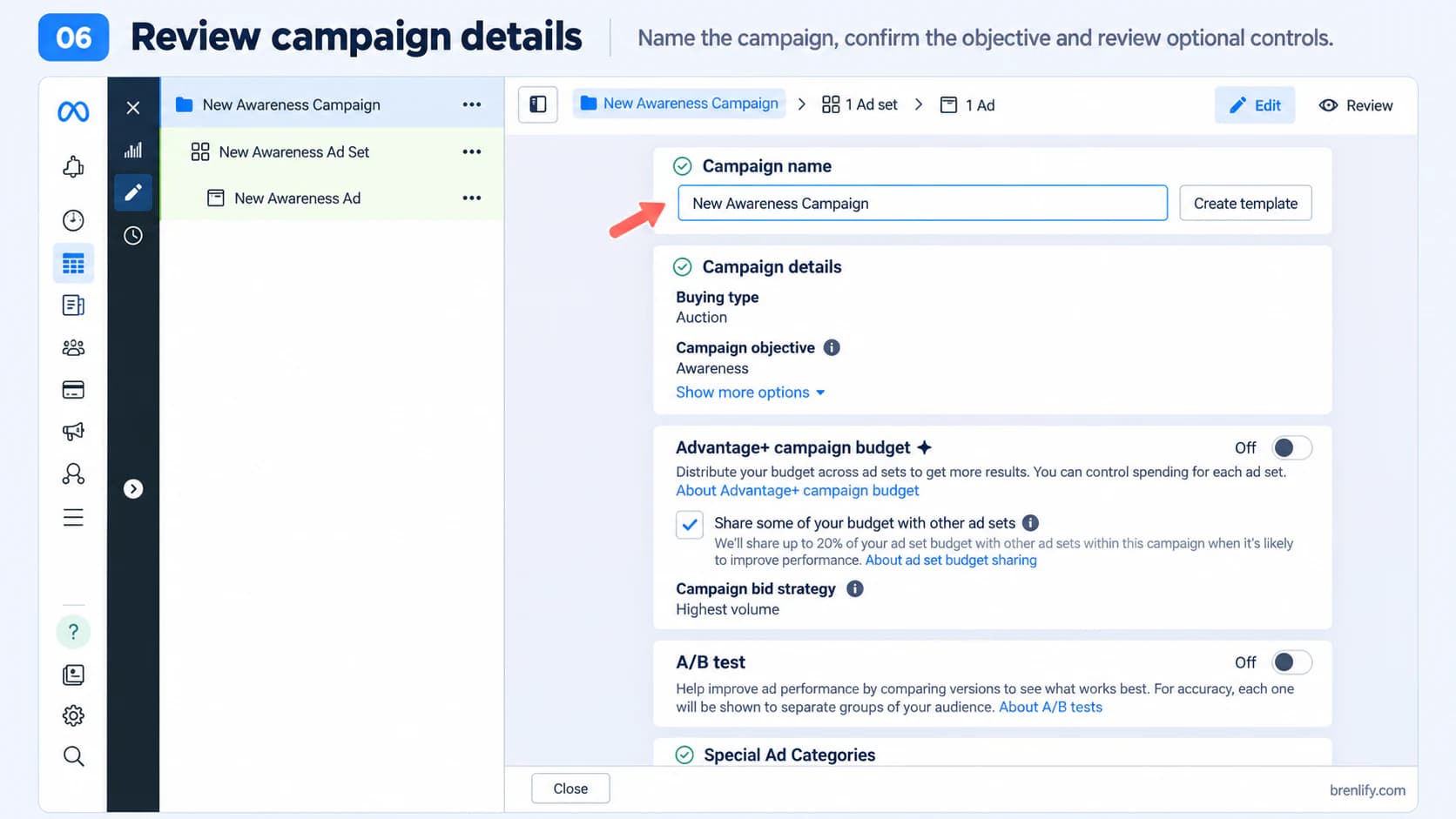
A useful convention includes objective, market, audience type, offer and date. For example: SALES | AU | COLD | PDF-OFFER | SEP26. Keep naming consistent across campaign, ad set and ad levels.

Step 6 showing campaign name and campaign-level settings in Meta Ads Manager

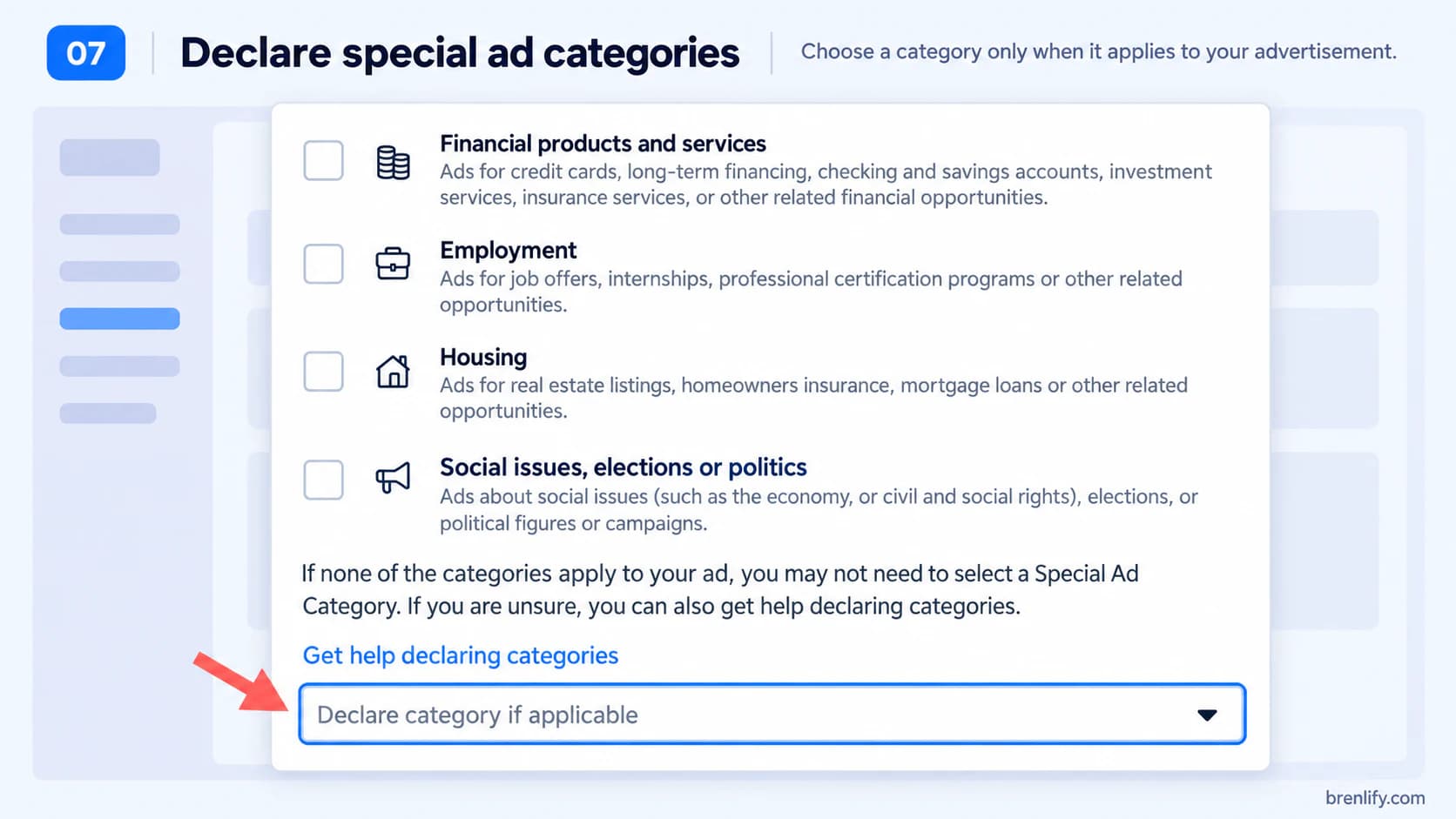
Declare a Special Ad Category when it genuinely applies

Meta applies additional rules to categories such as housing, employment, financial products and services, and ads about social issues, elections or politics. Do not select a category that does not apply, and do not skip it when it does.

Step 7 showing Meta Special Ad Categories
07

Set a budget that can actually test your target CPA

There is no universal best daily budget. Start with your target CPA and the number of results you need before you can make a useful decision. If your target acquisition cost is $40, a $5 daily budget may take a long time to produce even one expected purchase.

Planning heuristicInitial test budget = target CPA × the number of conversion opportunities you want to fund.

This is not a Meta rule and it does not guarantee conversions. It simply connects the test budget to your economics instead of picking an arbitrary number.

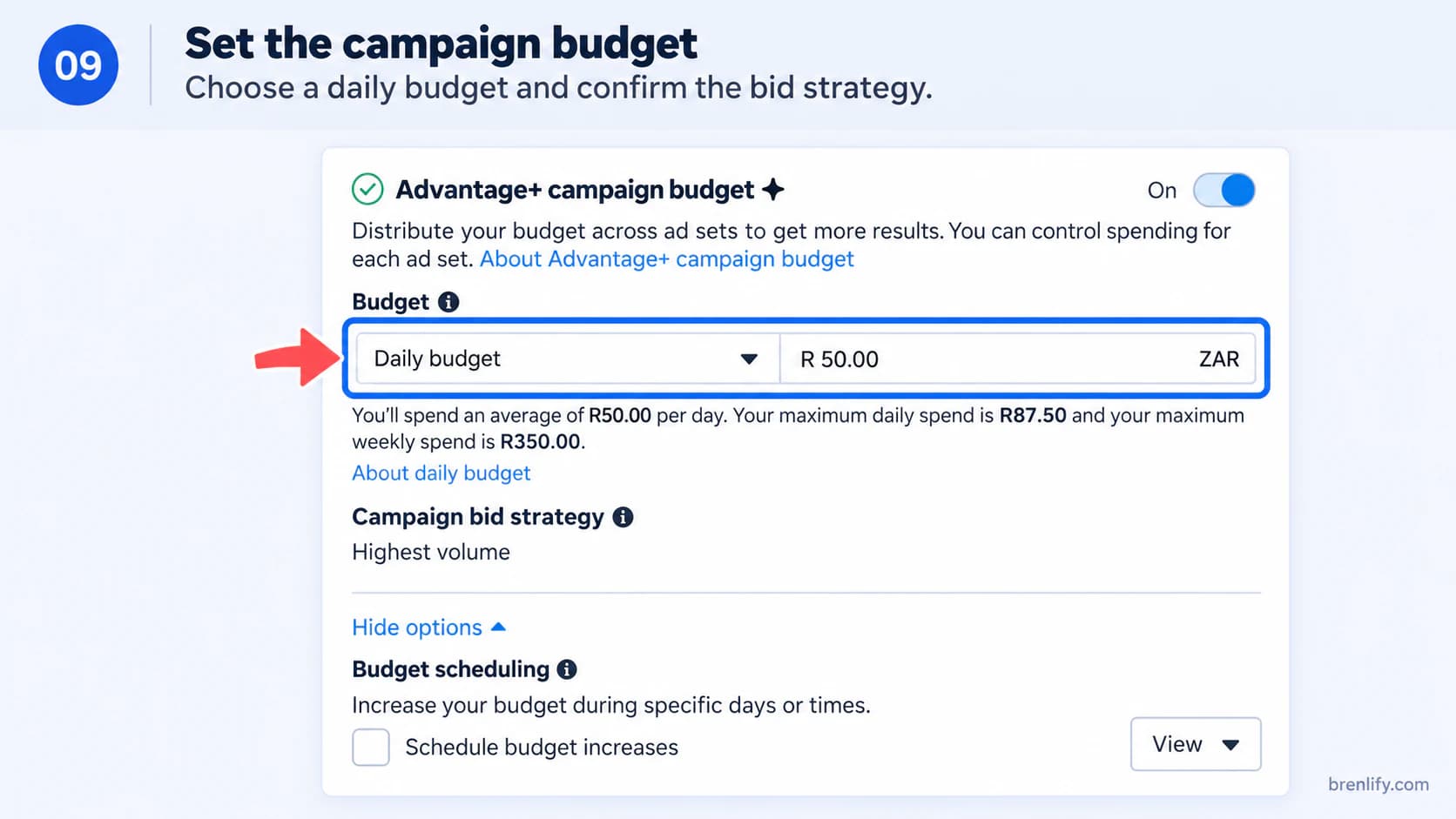
With one ad set, an ad-set budget is easy to understand. With multiple ad sets, Advantage+ campaign budget can distribute money between them based on delivery opportunities. Do not create several tiny ad sets simply because the interface allows it.

Step 9 showing Advantage+ campaign budget and daily budget controls

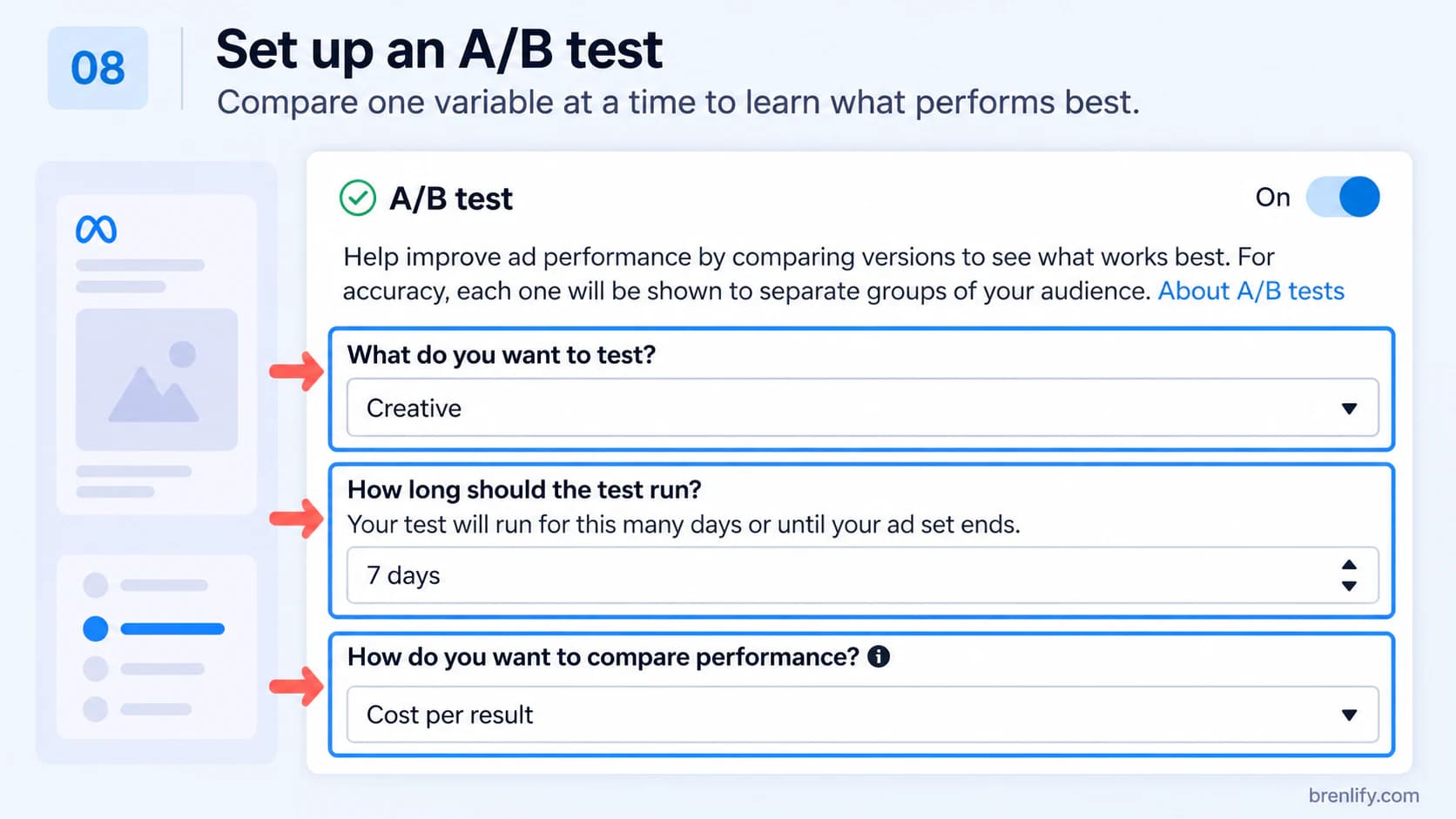
Use A/B testing when you can afford a clean test

A/B testing is useful when you want to isolate one variable, such as creative or audience, and have enough budget to give both sides a fair chance. For a small first campaign, it can be better to keep the structure simple and test several distinct ads inside one ad set.

Step 8 showing Meta Ads Manager A/B test controls
08

At the ad-set level, tell Meta exactly what a successful result is

This is one of the most important parts of the campaign and it is not shown in the supplied screenshots. For a direct website sale, the setup should point the delivery system towards the actual purchase, not an easier proxy event.

  1. Conversion location: choose Website when the transaction happens on your site.
  2. Dataset or Pixel: select the data source installed on that website.
  3. Performance goal: choose the option that maximises conversions or purchases where available in your account setup.
  4. Conversion event: use Purchase for a direct sale. Use Lead for a lead campaign when a lead is the real outcome.
  5. Schedule: set a start date and only add an end date when the offer or test genuinely requires one.
Meta changes labels and consolidates Advantage+ controls over time, and accounts do not always receive interface changes simultaneously. Follow the principle even if the exact wording on your screen is slightly different: optimise for the deepest reliable event that represents the business result.
09

Set real constraints, then give the delivery system room to learn

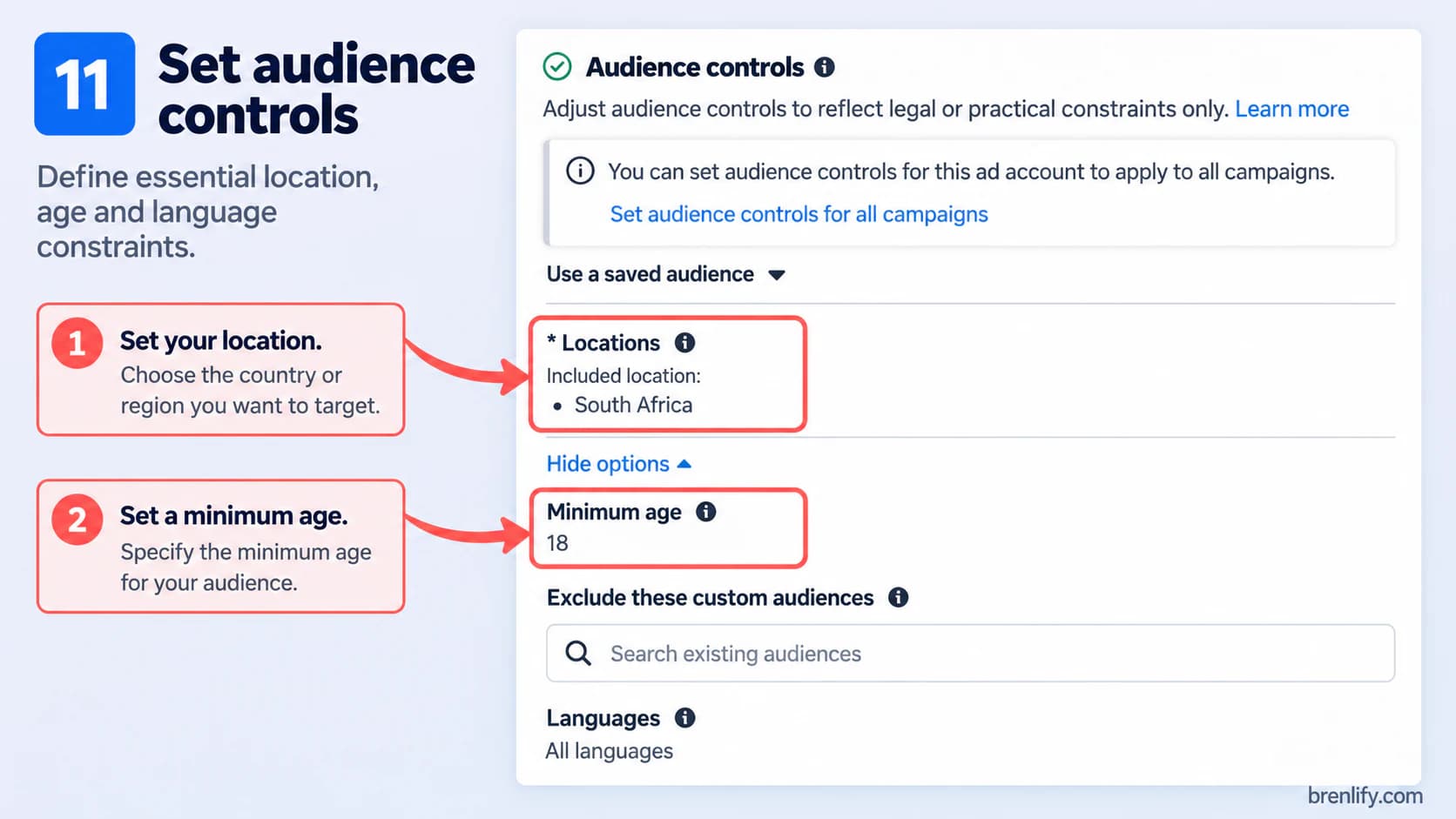
Start with constraints that actually matter: where you can sell, legal age limits, languages where necessary, and exclusions such as existing purchasers when appropriate. Do not confuse a very narrow audience with a very accurate audience.

Step 11 showing location, age, language and audience controls in Meta Ads Manager

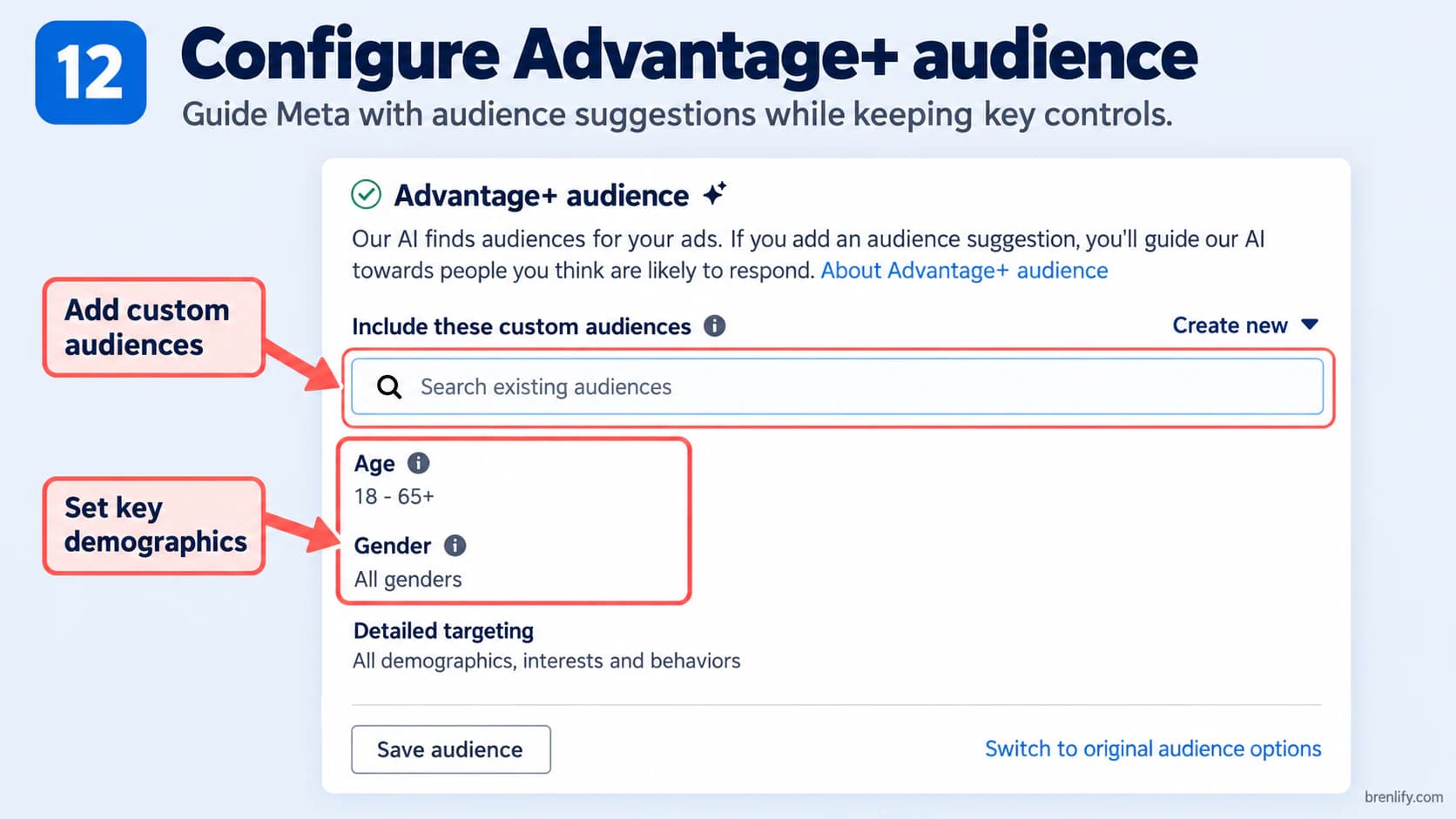
Advantage+ audience can use your suggestions and conversion signals while expanding beyond them when Meta predicts it can find better results. For many new purchase campaigns, a broad audience with useful signals is a strong starting point.

Step 12 showing Advantage+ audience, custom audiences and demographic suggestions

Useful audience building blocks

  • Cold prospecting: people in your sellable geography who have not purchased yet.
  • Customer list: useful for exclusions, retention or building signals when you have the necessary rights and permissions to use the data.
  • Website visitors and engagers: useful for retargeting when the pool is large enough to deliver.
  • Interest suggestions: useful as hypotheses, not as proof that someone is ready to buy.
10

Start with Advantage+ placements unless you have a reason not to

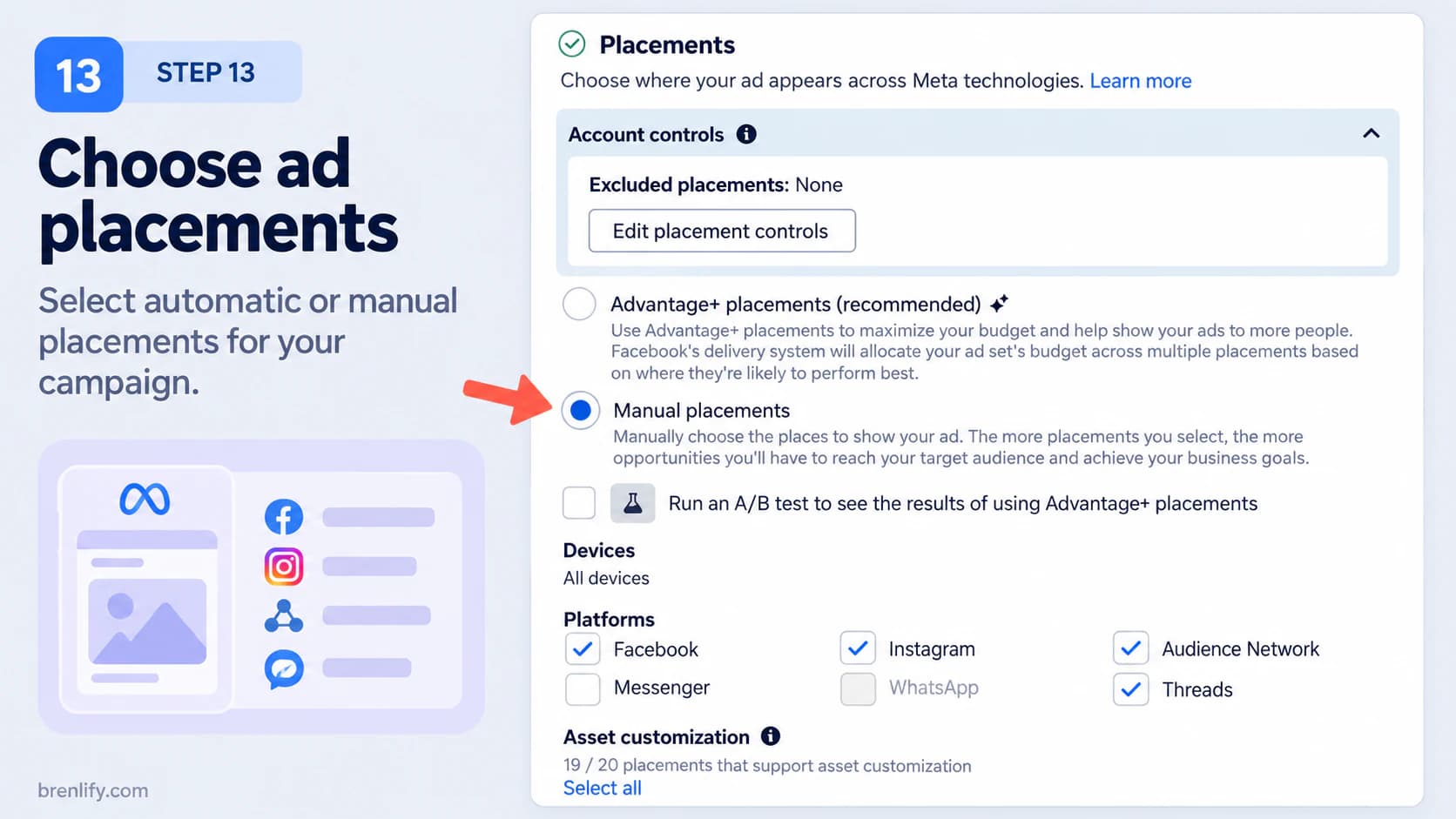
Placement is where the ad can appear across Facebook, Instagram, Messenger and other eligible Meta inventory. Advantage+ placements gives the delivery system more opportunities to find lower-cost outcomes.

The screenshot below has Manual placements selected so the available surfaces can be seen. For a new conversion campaign, start with Advantage+ placements unless creative, compliance or your own performance data gives you a clear reason to restrict delivery.
Step 13 showing Advantage+ and manual placement choices in Meta Ads Manager

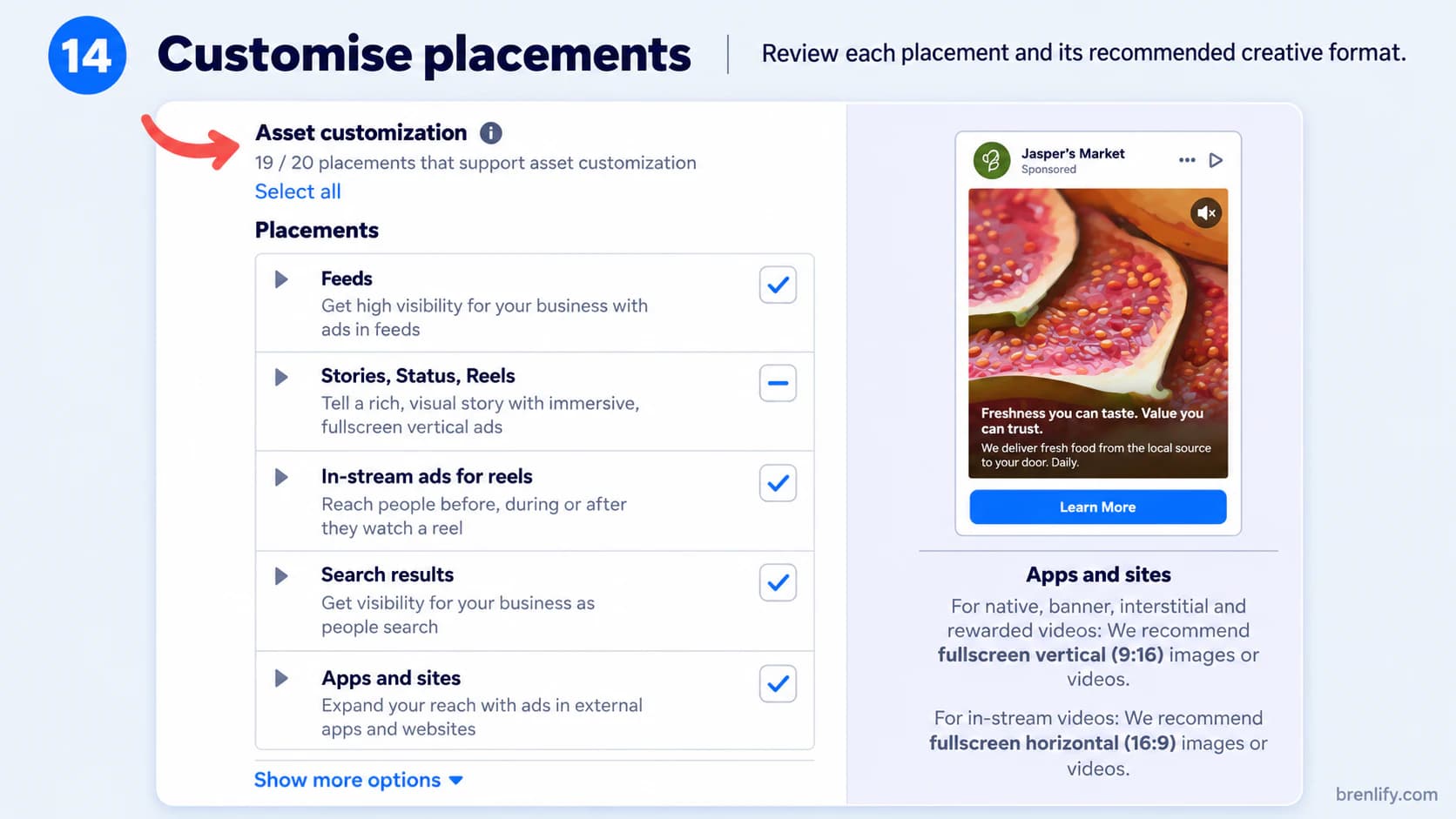
Placement automation works better when the creative can adapt. Prepare assets for feeds and vertical placements rather than forcing one crop everywhere. Review previews for text cut-off, important details under interface buttons and poor automatic crops.

Step 14 showing placement asset customisation across feeds, Stories, Reels and other placements
11

Build the ad around one clear promise and one next action

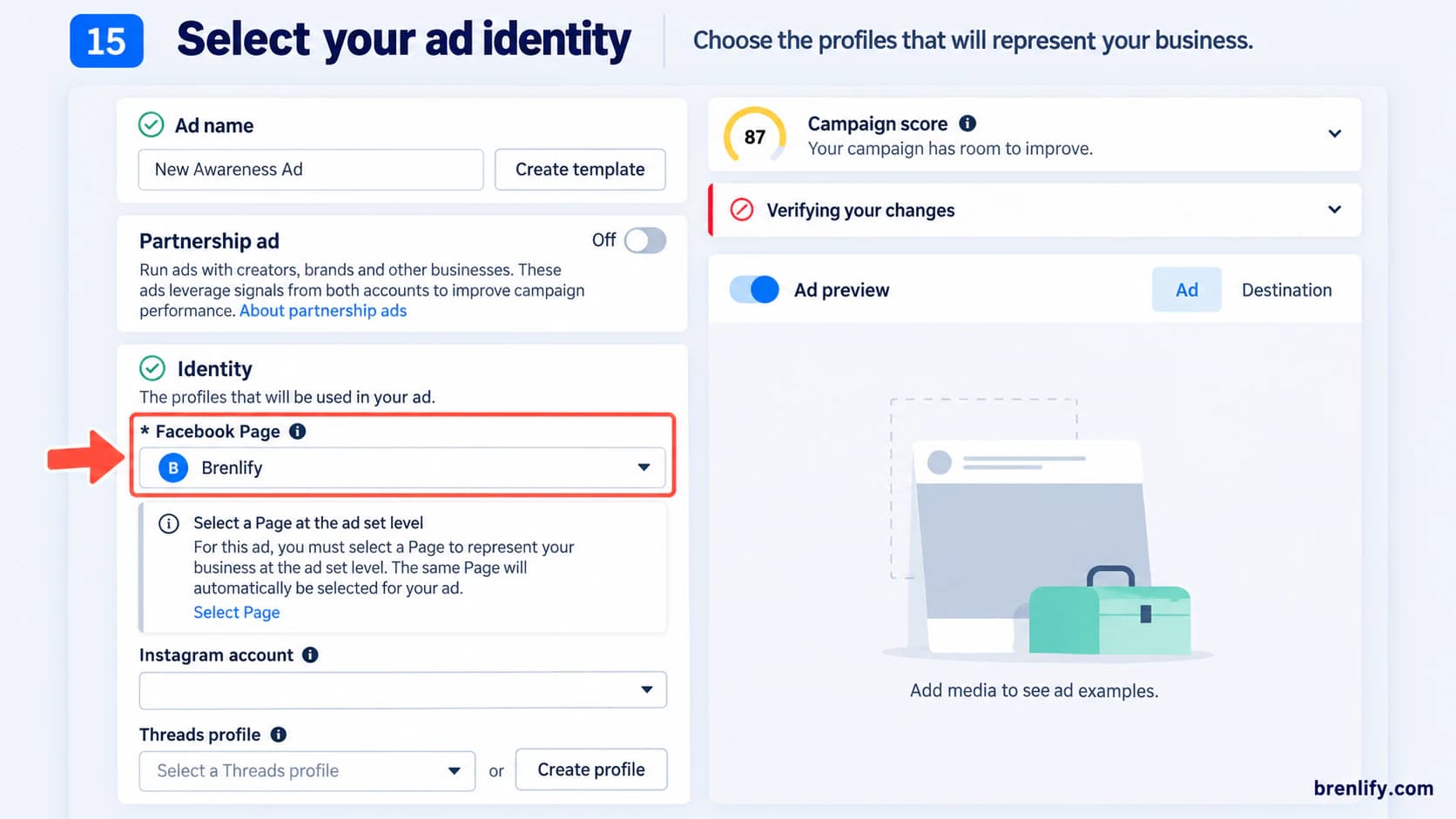
At the ad level, choose the Facebook Page and connected Instagram account that should represent the business. Make sure the identity matches the landing page so the customer does not feel they have been sent somewhere unrelated.

Step 15 showing Facebook Page and Instagram identity selection for a Meta ad

Choose the format that demonstrates the offer best

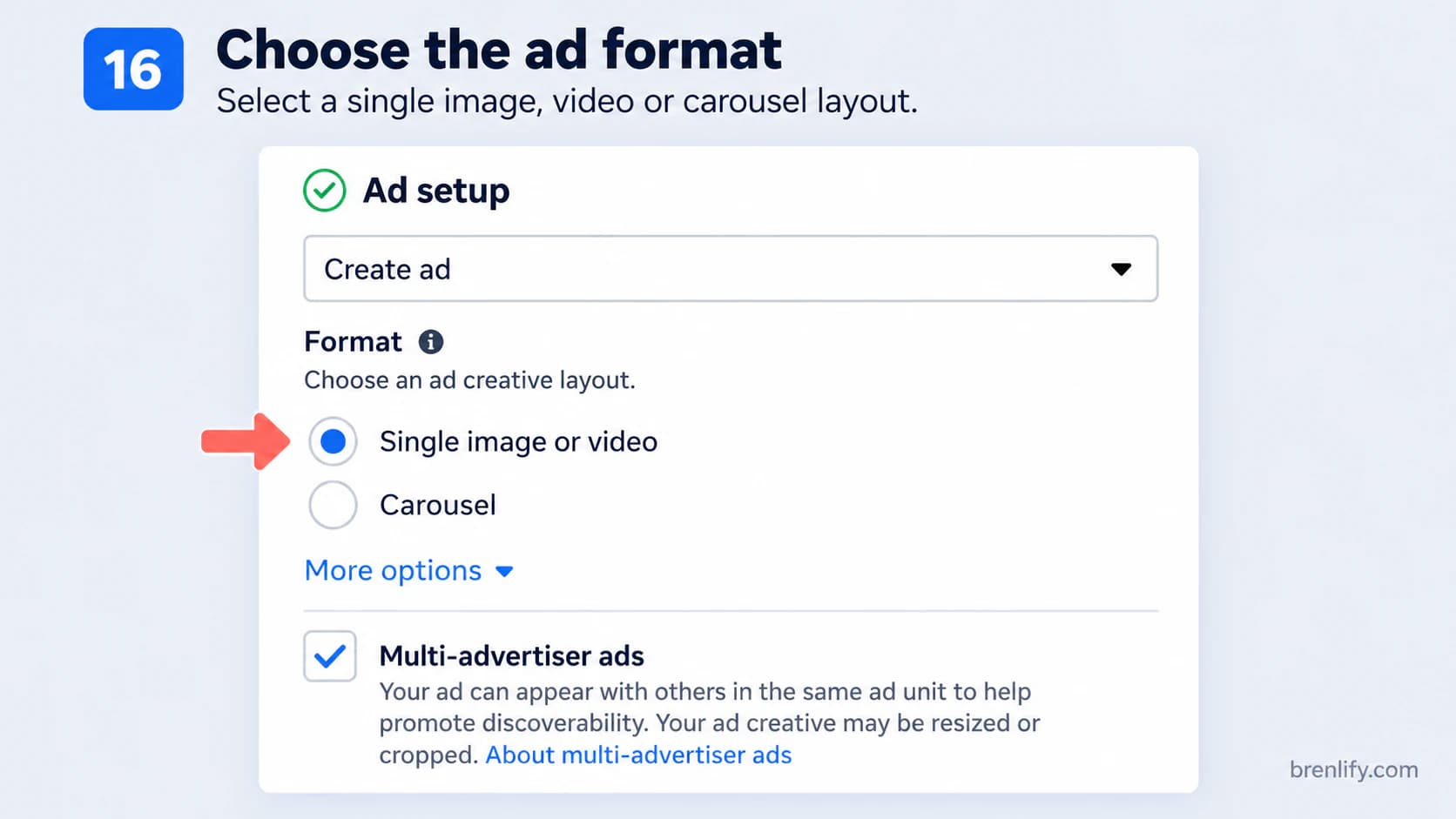
Single image or video is a strong default. Carousel is useful when sequence matters, such as showing several products, portfolio examples, features or steps. Do not choose a complex format because it looks impressive. Choose it because it helps the buyer understand.

Step 16 showing single image, video and carousel ad format choices

Use a simple conversion-copy structure

01
Hook

Earn attention with a recognised problem, desired result, proof point or surprising insight.

02
Problem or desire

Show that you understand what the customer is trying to change.

03
Mechanism

Explain how the product, PDF or service helps without writing a full landing page inside the ad.

04
Proof

Add credible evidence such as samples, demonstrations, reviews or project examples.

05
Offer and CTA

Tell people what they get and what to do next.

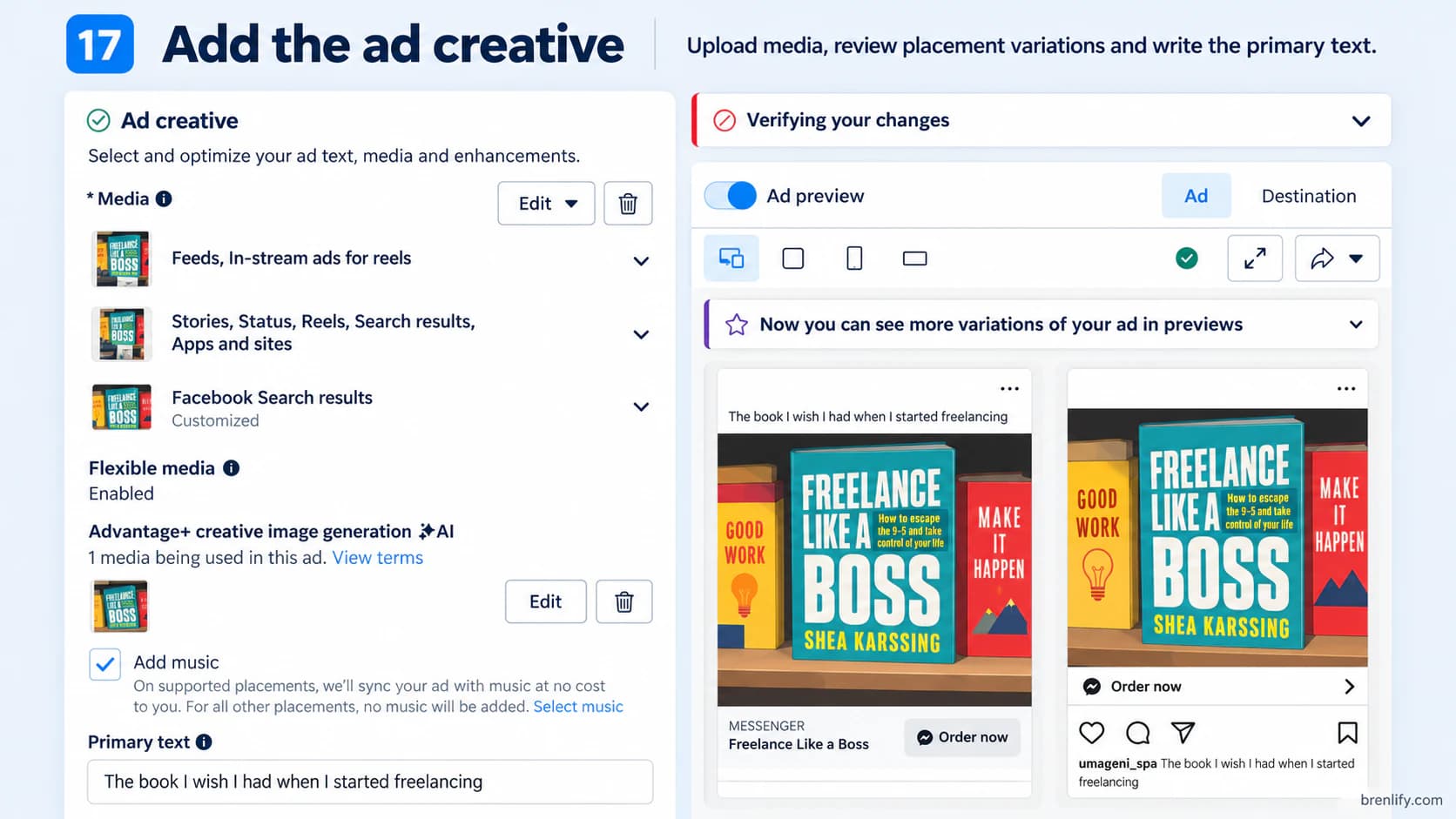
Step 17 showing ad creative, primary text and placement previews in Meta Ads Manager

Test concepts, not cosmetics. A pain-point ad, demonstration ad and proof-led ad teach you more than three versions of the same design with different button colours.

12

Send the click to the place where the sale can actually happen

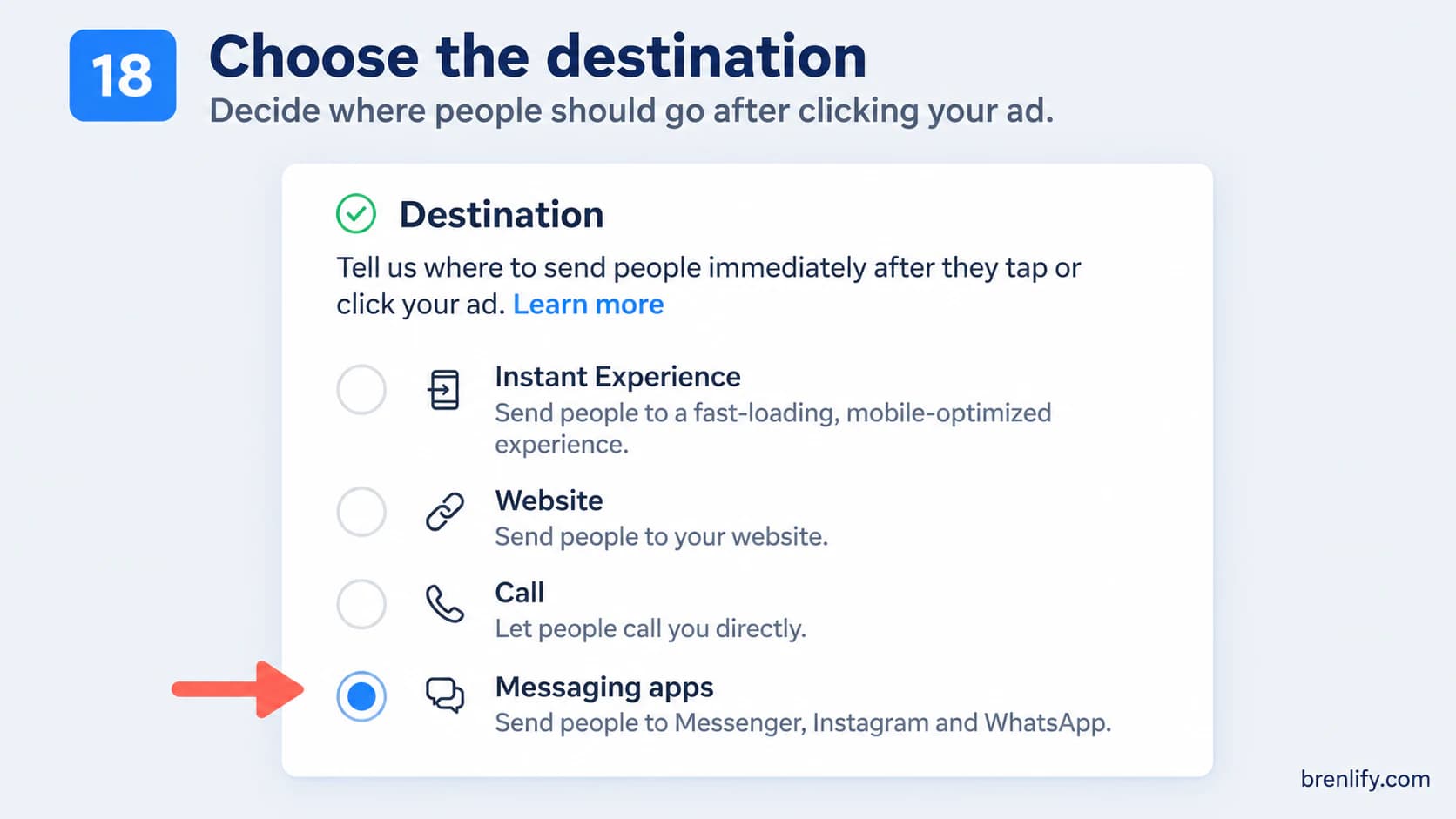
The destination depends on the business model. For a PDF, ecommerce product or fixed-price service that can be purchased online, Website is normally the direct route. For a service where qualification and discussion happen before the sale, messaging or a lead form can be more appropriate.

The screenshot below has Messaging apps selected as an example. For the direct-sales setup in this guide, select Website and send the customer to the relevant product or service landing page.
Step 18 showing website, Instant Experience, call and messaging destination options

Add UTM parameters so your analytics can identify the campaign and ad. Keep the destination fast on mobile, preserve the promise from the creative and remove unnecessary navigation when a focused landing page is more useful.

Instant Experience is optional

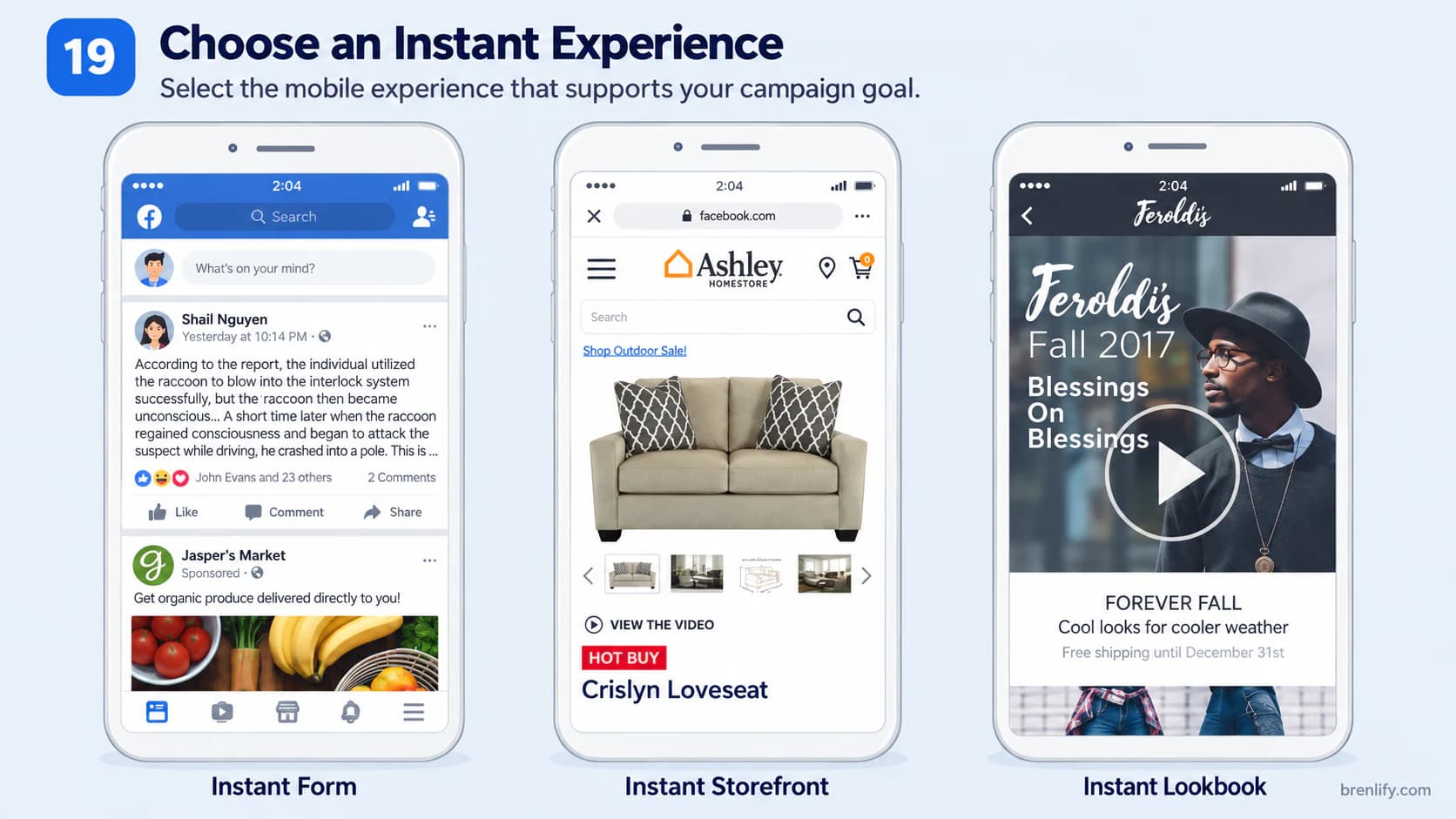
Instant Experience can create a mobile experience inside Meta. It can help when you need a fast in-app story, lookbook or lead journey, but it is not a required step in a profitable website-sales campaign.

Step 19 showing examples of Meta Instant Experience formats
13

Publish, verify the data, then stop touching everything

After publishing, Meta reviews the ad before or as delivery begins. Once it is active, check that spend, impressions and the important website events are being recorded. Then give a healthy campaign enough time to collect useful data.

  • Fix immediately: rejected ads, no delivery, broken URLs, wrong products, tracking errors, duplicate purchases or serious checkout problems.
  • Do not panic over: one expensive hour, one day with no sale or a temporary CPM swing.
  • Avoid constant material edits: repeatedly changing budget, targeting, optimisation or creative can make delivery harder to interpret.
  • Use several days as a starting window: 3-7 days can be a practical first observation period, but high-spend campaigns may collect evidence faster and low-spend campaigns may need longer.
14

Read the funnel from the business result backwards

Start with purchases, qualified leads, revenue, CPA and contribution profit. Then use platform metrics to diagnose why the business result is strong or weak. A high CTR is useful only if the clicks continue through the funnel.

What you seeWhat it can meanWhat to investigate next
High CPM + weak link CTRThe ad is expensive to show and people are not responding.Test a stronger angle, hook or visual. Check whether targeting is unnecessarily narrow.
Good clicks + low landing-page viewsThe page may be slow, broken or losing people during the redirect.Test the page on mobile, improve load speed and verify the destination URL.
Landing-page views + few add-to-carts or enquiriesThe offer, message match or page persuasion is weak.Clarify the outcome, proof, price, CTA and reasons to act now.
Add-to-carts + weak checkout startsUnexpected costs or friction may be appearing before checkout.Review shipping, fees, trust signals, checkout steps and mobile usability.
Checkout starts + weak purchasesPayment friction, final price shock or technical issues may be blocking sales.Test payment methods, checkout errors and final costs on real devices.
Purchases + poor profitThe campaign may convert but the acquisition cost is too high for the margin.Improve AOV, margin, conversion rate or CPA. Do not scale an unprofitable result.
Frequency rising + response fallingThe audience may be seeing the same creative too often.Introduce fresh creative and new angles before simply increasing budget.

The metrics that deserve your attention

Purchases / qualified leadsRevenueCPA / CPLROASContribution profitCPMLink CTRCPCLanding-page viewsAdd to cartCheckout startedPurchase conversion rateFrequency

There is no universal good CTR, CPC or ROAS that makes a campaign profitable. Use those metrics as diagnostics against your own funnel, market and historical baseline.

15

Add retargeting when there is enough warm traffic to justify it

Retargeting is valuable because it speaks differently to people who already know the offer. But a tiny warm audience does not need five separate ad sets. Wait until the account has enough visitors, engagers, leads or cart activity to deliver consistently.

Viewed but did not actAnswer the next objection

Use proof, demonstrations, examples, FAQs or a clearer explanation of value.

Added to cartReduce purchase friction

Remind them what they chose, address risk and surface genuine offer details.

Social engagerMove from interest to offer

Show the product or service clearly rather than repeating general awareness content.

Existing purchaserExclude or upsell intentionally

Do not keep paying to sell the same first purchase unless repeat buying is part of the plan.

Use windows that fit the buying cycle. A low-cost PDF may need a short reminder period. A considered B2B service may need a longer one. Exclude purchasers from acquisition retargeting and keep audience overlap simple.

16

Scale the economics, not the excitement

A campaign is ready to scale when it has produced repeatable results around your target CPA or profit threshold, not because it had one cheap sale. Scaling normally makes the system explore more expensive inventory, so efficiency can change as spend rises.

Vertical scaling: increase the budget carefully

A conservative practitioner approach is to raise budget in measured steps, such as 15-25%, then watch whether CPA and conversion quality remain acceptable. That range is a planning heuristic, not a Meta requirement. Larger increases can work, but they also make it harder to know whether the original economics are still stable.

Horizontal scaling: create more ways to win

  • Introduce new creative angles before the original winner becomes tired.
  • Test new offers, bundles or landing-page approaches where the economics support them.
  • Expand geography only when the business can serve it properly.
  • Add new audience hypotheses without fragmenting the budget into many tiny ad sets.
  • Improve conversion rate and AOV so the campaign can afford a higher acquisition cost.
If a campaign is below break-even, increasing budget usually scales the loss. Fix the constraint first.
17

Use the campaign objective that matches how your business actually closes

These are practical starting structures for common digital products, service businesses, ecommerce offers and local businesses. They are not rigid templates. The correct setup follows the conversion path the customer really takes.

OfferObjectiveDestinationOptimise forCreative focus
PDF or digital downloadSalesWebsitePurchaseShow the outcome, the product itself, what is inside and why it saves time or solves a problem.
Fixed-price service with online checkoutSalesWebsitePurchaseSell the outcome and reduce perceived risk with process, examples, scope and a clear price.
Service that closes after a conversationLeads or Engagement for messagingInstant form, website form or messagingQualified lead or booked conversationPre-qualify the prospect so cheap enquiries do not become expensive sales work.
Ecommerce productSalesWebsitePurchaseLead with the product benefit, proof, offer and product-in-use creative.
Local appointment businessLeads or SalesWebsite booking, form or callBooked appointment or qualified leadUse local proof, service area, availability and a direct booking action.

A simple first campaign for a digital product or PDF

Use one Auction Sales campaign, Website as the conversion location, Purchase as the conversion event, one reasonably broad prospecting ad set in the market you can serve, Advantage+ placements and two to five distinct ads. Send each ad to the specific product landing page, not the homepage. Once enough warm traffic exists, add retargeting with proof, sample pages, FAQs or a different offer angle.

A simple first campaign for a service business

If the service can be bought directly online, the same Sales structure can work. If the service normally needs discovery, scoping or a conversation, optimise for a qualified lead, booked call or messaging conversation instead. Measure downstream sales in your CRM so the cheapest lead does not automatically become the winning ad.

18

The mistakes that make Facebook ads feel like gambling

  • Starting with Ads Manager instead of the numbers: you cannot know if the campaign is good without a target CPA and break-even point.
  • Choosing Traffic when you need sales: cheap clicks are not the same as cheap customers.
  • Running without reliable conversion tracking: the algorithm and your decisions both depend on accurate events.
  • Over-targeting: tiny interest stacks can remove useful delivery opportunities and make acquisition more expensive.
  • Launching one creative: when the ad fails, you learn almost nothing about which message could work.
  • Sending people to the homepage: make the path from ad promise to purchase or enquiry direct.
  • Editing every day: constant changes make it difficult to separate normal variance from a real trend.
  • Watching vanity metrics: a cheap CPM or high CTR does not pay the bills if the funnel does not create profitable customers.
  • Scaling before profitability: more spend does not fix bad economics.
  • Never refreshing creative: even a winning message can fatigue.
19

A practical seven-day launch rhythm

This is an operating rhythm, not a promise that every campaign will be decided in one week. It is designed to stop beginners from making random changes while still catching real problems early.

Before launchDay 0

Verify Pixel/CAPI events, Purchase or Lead value, URLs, UTMs, checkout, offer, creative previews and mobile page speed.

Delivery checkDay 1

Confirm the ads are approved, spending normally and sending events. Fix only genuine technical or policy problems.

Early signalDays 2-3

Watch delivery, click quality and funnel movement. Avoid declaring a winner from a handful of impressions or one purchase.

Economics reviewDays 4-7

Compare spend with target CPA, purchases, contribution profit and funnel drop-offs. Pause obvious weak creative when evidence is meaningful.

Next cycleWeek 2

Keep profitable ads, create new angles, improve the weakest funnel step, add retargeting if there is enough volume and scale only when economics hold.

20

Common Facebook ads questions

Should I choose Traffic or Sales if I want purchases?

Choose Sales when the real goal is a purchase and you can track that purchase. Traffic tells Meta to find people likely to click. Sales gives the delivery system a stronger signal about the business outcome you actually want.

How much should I spend on my first Facebook ads campaign?

Start from your target CPA rather than a random daily amount. A budget needs to be large enough to buy meaningful chances of a conversion within your test period. If your target CPA is $40, a $5 daily budget may take a long time to tell you anything useful. Use money you can afford to test and judge the campaign against your own economics.

Is $5 a day enough?

It can deliver ads, but it may be too slow for a purchase campaign with a much higher target CPA. Small budgets work better when the conversion value and expected CPA are also small. The question is not whether Meta accepts the budget, but whether the budget can generate enough useful data for your decision.

Should I use broad targeting or interests?

For many conversion campaigns, a reasonably broad audience with clear location and legal constraints is a strong starting point because Meta can use conversion signals to find buyers. Interests can still be useful as suggestions or tests, especially when the account has little data, but do not narrow the audience simply to make it feel more precise.

Should I use Advantage+ placements?

Usually, yes for a new conversion campaign. It gives Meta more inventory to find efficient results. Manual placements are useful when a placement cannot support the creative, compliance or customer experience you need, or when your own data repeatedly shows a placement is poor quality.

How many ads should I launch in one ad set?

For a modest beginner budget, two to five genuinely different ads is usually more useful than ten minor variations. Test different ideas and angles, not just button colours or one-word copy changes. With a very small budget, keep the number of ads lower so each has a chance to spend.

How long should I wait before changing the campaign?

Fix broken tracking, rejected ads or obvious technical problems immediately. Otherwise, avoid reacting to a few hours of data. Several days is a more useful starting window, but the real question is how much meaningful spend and conversion data the campaign has accumulated relative to your target CPA.

What is a good ROAS?

There is no universal good ROAS. A 2x ROAS can be excellent for a high-margin digital product and unprofitable for a low-margin physical product. Calculate your break-even ROAS from your own contribution margin, then set a target that leaves the profit you need.

Do I need the Meta Pixel?

If you are sending people to a website and want Meta to optimise for website actions such as purchases or leads, reliable conversion tracking is extremely important. Use the Meta Pixel and, where your platform supports it, Conversions API as well. Test the actual conversion event before spending.

Should I choose Traffic or Sales if I want purchases?

Choose Sales when the real goal is a purchase and you can track that purchase. Traffic tells Meta to find people likely to click. Sales gives the delivery system a stronger signal about the business outcome you actually want.

How much should I spend on my first Facebook ads campaign?

Start from your target CPA rather than a random daily amount. A budget needs to be large enough to buy meaningful chances of a conversion within your test period. If your target CPA is $40, a $5 daily budget may take a long time to tell you anything useful. Use money you can afford to test and judge the campaign against your own economics.

Is $5 a day enough?

It can deliver ads, but it may be too slow for a purchase campaign with a much higher target CPA. Small budgets work better when the conversion value and expected CPA are also small. The question is not whether Meta accepts the budget, but whether the budget can generate enough useful data for your decision.

Should I use broad targeting or interests?

For many conversion campaigns, a reasonably broad audience with clear location and legal constraints is a strong starting point because Meta can use conversion signals to find buyers. Interests can still be useful as suggestions or tests, especially when the account has little data, but do not narrow the audience simply to make it feel more precise.

Should I use Advantage+ placements?

Usually, yes for a new conversion campaign. It gives Meta more inventory to find efficient results. Manual placements are useful when a placement cannot support the creative, compliance or customer experience you need, or when your own data repeatedly shows a placement is poor quality.

How many ads should I launch in one ad set?

For a modest beginner budget, two to five genuinely different ads is usually more useful than ten minor variations. Test different ideas and angles, not just button colours or one-word copy changes. With a very small budget, keep the number of ads lower so each has a chance to spend.

How long should I wait before changing the campaign?

Fix broken tracking, rejected ads or obvious technical problems immediately. Otherwise, avoid reacting to a few hours of data. Several days is a more useful starting window, but the real question is how much meaningful spend and conversion data the campaign has accumulated relative to your target CPA.

What is a good ROAS?

There is no universal good ROAS. A 2x ROAS can be excellent for a high-margin digital product and unprofitable for a low-margin physical product. Calculate your break-even ROAS from your own contribution margin, then set a target that leaves the profit you need.

Do I need the Meta Pixel?

If you are sending people to a website and want Meta to optimise for website actions such as purchases or leads, reliable conversion tracking is extremely important. Use the Meta Pixel and, where your platform supports it, Conversions API as well. Test the actual conversion event before spending.

The principle to remember

Profitable Facebook ads come from the whole system, not one clever setting.

Know your economics, track the real conversion, give the campaign strong creative, send people to a convincing destination and diagnose the funnel from the business result backwards. You do not need to predict the winning ad before launch. You need a structure that can test ideas, identify what works, measure whether it is profitable and give you a disciplined way to improve it.

Related servicesNeed help with this?
Brenlify service

Social Content Starter Pack

From A$399

View service →
Brenlify service

Social Media Post Design

From A$99

View service →
Keep exploring

Related articles

View all articles →
Best Time to Post on TikTok article cover
Social Media

Best Time to Post on TikTok in 2026

12 min readRead article →
Best Time to Post on Instagram article cover
Social Media

Best Time to Post on Instagram in 2026

12 min readRead article →
How to Balance a Logo Like a Professional article cover
Branding

Why Does Your Logo Feel Off? How to Balance a Logo Like a Professional

18 min readRead article →

Keep learning with Brenlify Growth Lab

Explore more practical articles, guides and digital-growth resources at brenlify.com/growth-lab/insights.

Brenlify

Thoughtful branding, websites and creative support for businesses that want to look established, communicate clearly and grow with confidence.

Have a project in mind?

Let's make something worth noticing.

Start a project

Based in

Perth, Western Australia

hello@brenlify.com

Support

  • Help Center
  • FAQs
  • Trust & Safety

Legal

  • Terms of Use
  • Privacy Policy
  • Refund Policy

Company

  • About Us
  • Careers

© 2026 Brenlify. All rights reserved.

Grow Digital.

Instagram